
Eduroam (education roaming) is a worldwide initiative by universities to provide their employees and students with easy access to the internet via WLAN at the locations of all participating organizations. Only your own username and password is required for internet use. The WLAN you need to connect to usually carries the name eduroam.
Interactive maps of participating institutions can be found via the following links (please note that these maps are by no means exhaustive):
Important note:
Set up your eduroam access on your laptop or smartphone before your next visit to another university.
Set up Eduroam
- Eduroam Android
- Eduroam iOS
- Eduroam - Linux (Ubuntu)
- Eduroam - macOS
- Eduroam - Windows
General parameters
| Parameter | Value |
| Network authentication | WPA2/802.1x |
| Encryption | AES |
| Identity | Students: <user account>@stud.th-deg.de Staff: <user account>@th-deg.de e.g.: ab12345@stud.th-deg.de or mmustermann@th-deg.de Please do not confuse with the e-mail address! |
| EAP type | PEAP |
| Authentication | MSCHAPv2 |
| Server certificate | T-TeleSec GlobalRoot Class 2 |
| Server name | radius-ng.th-deg.de |
| Login | see identity |
Safety instructions
- All user data is stored on university servers.
- The data for authentication are routed to the THD via an encrypted tunnel via the DFN association.
- Authentication is performed on the THD's own servers.
- It is important to use the CA certificates to ensure a trustworthy connection (CA certificate from Deutsche Telekom).
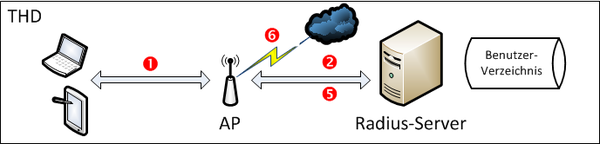
Scenario 1: THD member at the THD campus
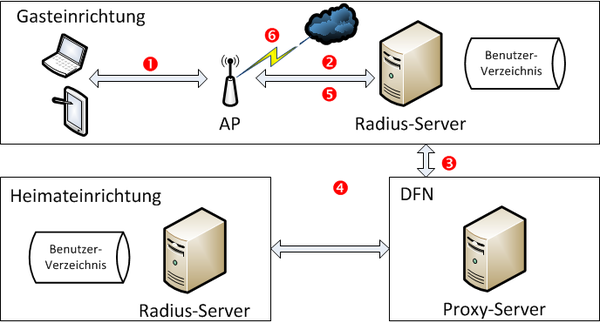
Scenario 2: THD member at a guest institution
Individual steps in connection setup (red dots in the drawings)
- 1. The user connects to the WLAN infrastructure of the university.
- 2. Username and password are transferred to the radius server.
- 3. External user data are passed on to the DFN radius server.
- 4. The DFN-Verein conveys the data to the home institution where the authentication takes place.
- 5. The WLAN infrastructure is informed of whether the authentication was successful by the answer of the home institution or the university radius server.
- 6. If successful a corresponding network is assigned to the client.
When university members login at the DIT campus, authentication is carried out directly on site. A forwarding to the DFN-Verein will not take place in this case.
If you are at an institution that also offers eduroam, it's always the same. Authentication always takes place on university servers. It is important to use the CA certificates to ensure a trustworthy connection.